
Every Adobe Commerce (Magento 2) project has an observer on sales_order_place_after that calls another system: an ERP, a fulfilment service, a CRM. When that system is slow, checkout is slow. When it's down, the order fails, or it never reaches the other side and nobody finds out until someone asks where it went. Commerce events (Adobe I/O Events for Adobe Commerce) move that call out of the request. Commerce publishes the event, Adobe I/O Events delivers it, and your action handles it on its own time.
Below: connect Commerce to the workspace, subscribe to order placement with only the fields the other system needs, and write a handler that's safe when the same event arrives twice. About an hour.
On the projects I know, the first one I'd move is an order export: an observer that sends every new order to the ERP.
TL;DR
- A Commerce event moves the
sales_order_place_aftercall out of checkout: Commerce publishes, Adobe I/O Events delivers, an App Builder action handles it. - Subscribe with only the fields the other system needs. A field path that matches nothing isn't an error: Commerce sends
{}and marks the event as sent. - The same order can arrive twice, so the action claims the order in one atomic call before it sends.
You’ll need
- The App Builder project from the earlier episodes, deployed to Stage
- Adobe Commerce with eventing available. On PaaS, install the eventing modules as Adobe's installation guide describes, and make sure cron runs; on Commerce as a Cloud Service, eventing is built in
- Your workspace configuration downloaded from Developer Console as JSON
Connect Commerce to your workspace
In the Commerce admin, open Stores > Settings > Configuration > Adobe Services > Adobe I/O Events > General configuration.
- Paste the whole workspace JSON into Adobe I/O Workspace Configuration.
- Enter a unique Adobe I/O Event Provider Instance ID, such as
shop-stage. Letters, numbers, hyphens and underscores only. - Save.
On Adobe Commerce on cloud infrastructure, also set ENABLE_EVENTING: true under stage.global in .magento.env.yaml, and configure the cron consumers runner as the docs describe.
Create the event provider
The event provider is the source that shows up in Developer Console. In the same admin section, click Create Event Provider, give it a label and description, and the Adobe I/O Event Provider ID fills in. On PaaS you can do the same from the CLI, then paste the ID it prints:
bin/magento events:create-event-provider --label "Shop Stage" --description "Commerce events from Stage"Then, under Commerce events, set Enabled to Yes and fill Merchant ID and Environment ID. Together they become each event's source, <merchant-id>.<environment-id>, which is how you tell Stage from Production downstream. Click Send Test Event to check the connection.
Subscribe, with only the fields you need
Observer events take the observer. prefix. Send a small payload: the order number, the total, and nothing personal unless the other system really needs it.
bin/magento events:subscribe observer.sales_order_place_after \
  --fields=order.increment_id --fields=order.grand_total --priority
bin/magento events:list- One
--fieldsper field. Nested fields use dots, as in--fields=stock_data.qty.--fields='*'sends everything, which is rarely what you want. - Field paths start from what the event carries. This event carries the order under
order, so the order number isorder.increment_id. A path that matches nothing isn't an error: Commerce sends an empty object and marks the event as sent. My first real test order arrived as{}. Check one real payload before you trust a field list. --prioritysends the event right away instead of waiting for the batch. On my test orders it left Commerce 3 to 4 seconds after the order was saved. Without it, cron batches events once a minute.--ruleswith--parentfilters at the source, for example only products whose stock drops below 20:--parent observer.catalog_product_save_after --rules="stock_data.qty|lessThan|20".
Fields inside an array use [] notation, as in order.items[].sku, so you can send the SKUs of an order without the rest of each item. I have only run the two fields above against a real order; check a nested path on one real payload before you rely on it. On Commerce as a Cloud Service, subscriptions are created in the admin under System > Events. Teams that keep configuration in code can declare subscriptions in a module's io_events.xml.
Register the event in Developer Console
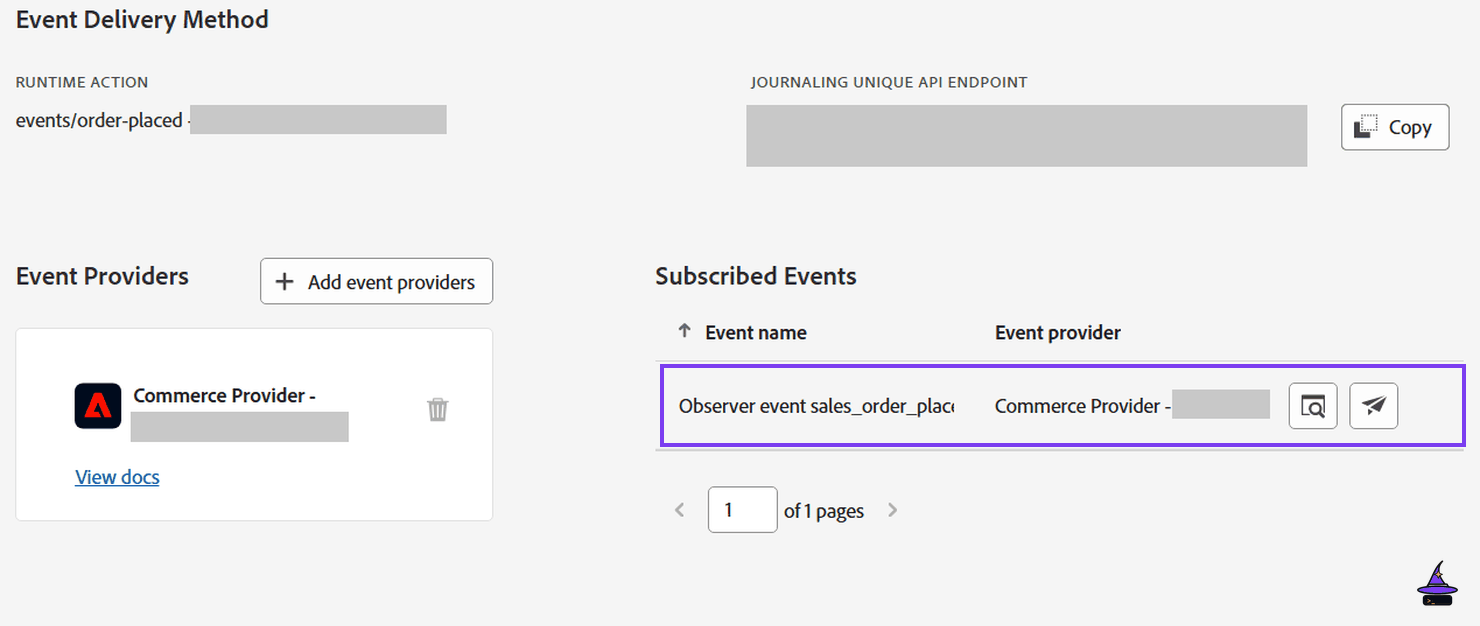
In your Stage workspace, choose Add service > Event > Commerce events, pick your provider, tick observer.sales_order_place_after, and choose your Runtime action as the destination. If "Commerce events" doesn't appear, run bin/magento events:metadata:populate, or click Execute Synchronization in the admin.
Handle the event, and make it idempotent
Commerce retries sending events to Adobe I/O, up to 7 times by default, so the same order can arrive more than once, and two copies can arrive at the same moment. Checking "already sent?" and then sending isn't enough: both copies check before either one writes, and the ERP gets the order twice.
So the action claims the order first, in one atomic call. An order_claims collection holds one document per order, with a unique index on order (add it to the post-deploy hook from episode 4). The upsert either takes a claimable document (a failed send, or a sending claim old enough to belong to a run that died) or inserts a new one. If a sent or fresh sending claim exists, the insert hits the unique index and throws, and this copy backs off. The action needs the same include-ims-credentials: true annotation as the actions in episode 4.
const { Core } = require('@adobe/aio-sdk')
const libDb = require('@adobe/aio-lib-db')

const STALE_SENDING_MS = 10 * 60 * 1000

function isDuplicateKeyError (err) {
  for (let e = err, depth = 0; e && depth < 5; e = e.cause, depth++) {
    if (e.code === 11000 || e.code === '11000' || /E11000|duplicate key/i.test(e.message || '')) return true
  }
  return false
}

async function main (params) {
  const logger = Core.Logger('order-placed', { level: params.LOG_LEVEL || 'info' })
  const raw = params.data?.value ?? params.data ?? {}
  const order = (raw && typeof raw.order === 'object' && raw.order !== null) ? raw.order : raw
  const id = order.increment_id
  if (typeof id !== 'string' || !/^\S{1,64}$/.test(id)) {
    logger.warn(`no order number in event: ${JSON.stringify(Object.keys(order && typeof order === 'object' ? order : {}))}`)
    return { statusCode: 400, body: { error: 'no order number' } }
  }

  let client
  try {
    const token = await Core.AuthClient.generateAccessToken(params)
    client = await (await libDb.init({ token: token.access_token, region: 'emea' })).connect()
    const claims = await client.collection('order_claims')
    const runs = await client.collection('export_runs')
    const staleBefore = new Date(Date.now() - STALE_SENDING_MS).toISOString()

    try {
      await claims.updateOne(
        { order: id, $or: [{ status: 'failed' }, { status: 'sending', at: { $lt: staleBefore } }] },
        { $set: { status: 'sending', at: new Date().toISOString() } },
        { upsert: true }
      )
    } catch (e) {
      const claim = await claims.findOne({ order: id }).catch(() => null)
      if (claim?.status === 'sent') {
        logger[isDuplicateKeyError(e) ? 'info' : 'warn'](`order ${id} already claimed (sent)`)
        return { statusCode: 200, body: { skipped: true } }
      }
      if (claim?.status === 'sending' && claim.at >= staleBefore) {
        logger[isDuplicateKeyError(e) ? 'info' : 'warn'](`order ${id} already claimed (sending)`)
        return { statusCode: 503, body: { error: 'in progress, retry later' } }
      }
      throw e
    }

    try {
      await sendToErp(params, order)
    } catch (e) {
      try {
        await claims.updateOne({ order: id, status: 'sending' }, { $set: { status: 'failed', at: new Date().toISOString() } })
      } catch (e2) {
        logger.warn(`order ${id}: could not release the claim: ${e2.message}`)
      }
      throw e
    }
    const at = new Date().toISOString()
    await runs.updateOne({ order: id, status: 'sent' }, { $set: { at } }, { upsert: true })
    await claims.updateOne({ order: id, status: 'sending' }, { $set: { status: 'sent', at } })
    return { statusCode: 200, body: { sent: id } }
  } catch (e) {
    logger.error(`order ${id}: ${e.message}`)
    return { statusCode: 500, body: { error: e.message } }
  } finally {
    if (client) await client.close()
  }
}
exports.main = main
A copy that finds the order already sent answers 200. One that finds it still in progress answers 503, not 200: the copy holding the claim may yet fail, and a retry has to stay possible. According to Adobe's FAQ, I/O Events retries only 429 and 5xx answers (except 505), for up to 24 hours, so a 409 would end the retries. On my Stage workspace, a 503 from a Runtime action was retried three times, with the wait doubling each time: 1 minute, then 2, then 4. I stopped watching there. A 409 got no retry in the 7 minutes I watched. Two copies of the same test order, invoked by hand at the same moment, gave one 200 and one 503, and left one claim document and one sent row. The retry was measured on a scratch action, and the two copies were invoked by hand: the handler itself hasn't received a real redelivery yet. A failed send marks the claim failed so the next delivery can take it. The decision always comes from the claim document, never from the error text, because the exact wording of the duplicate-key error isn't something to rely on. Keep the stale window well above the action's timeout plus the ERP retries, or a slow run would look dead. The ERP's own idempotency key, if it has one, is the second line of defence.
Tip: Log the incoming payload's shape once on Stage, and adjust the order line to match. Keep sendToErp in its own file, so you can unit-test it with a mocked ERP.
Tip: Some projects subscribe to sales_order_save_commit_after instead. It fires on every later save of the order too, which is one more reason the claim matters.
Prove it, then switch the observer off
Place a test order on Stage. Check the registration's Debug Tracing tab in Developer Console first: on my Stage workspace, runs started by I/O Events showed up there, not in aio rt activation list or aio app logs. Then look at New Relic from episode 5, and at the collection with aio app db document find export_runs. Run both paths side by side for a few days: point the old observer at a sandbox, and compare what each one sent. Only then disable the observer.
Done!
Order placement now leaves Commerce without slowing checkout. Episode 7 covers the other direction: Commerce asking your app a question and waiting for the answer.