aio app logs is enough while you build. It's not enough when the stuck-order job from episode 3 fails at 3 a.m. on Production, and the person on call has never installed the aio CLI. Adobe recommends log forwarding for shared Stage and Production workspaces, and New Relic is one of the supported destinations. If your Commerce site already reports to New Relic, your App Builder actions can land next to it. Mine does: when something breaks, New Relic is where I look first. I ran these steps on my Stage workspace; the note at the end says what that run proved and what it didn't.
You’ll need
- A New Relic account, and an existing INGEST - LICENSE key (App Builder can't create one for you)
- The latest CLI:
npm install -g @adobe/aio-cli - The project bound to the workspace you want to forward from (check
AIO_runtime_namespacein.env;aio whereonly shows the CLI's global selection)
Pick the right endpoint for your New Relic region
Forwarding needs the base URI of New Relic's Log API, and it differs by region. Check the address you use to log in to New Relic:
https://one.newrelic.com/(US): usehttps://log-api.newrelic.com/log/v1https://one.eu.newrelic.com/(EU): usehttps://log-api.eu.newrelic.com/log/v1
Include the https://. A wrong region doesn't fail loudly; your logs just never arrive.
Configure forwarding for the workspace
Run the config command and answer the prompts:
aio app config set log-forwarding
? select log forwarding destination: New Relic
? base URI: https://log-api.eu.newrelic.com/log/v1
? license key: <your INGEST - LICENSE key>
The command applies the setting to the workspace straight away and stores it in .aio and .env, so later deploys keep it. Forwarding is configured per workspace, so do this once for Stage and once for Production, each with aio app use first.
Tip: The license key ends up in .env. That's another reason .env never goes into git (episode 1).
set also sends a test line of its own: "Test from Adobe IO Runtime" showed up in New Relic in the same second. Look for it first.
One consequence to know before you switch: once forwarding is on, aio app logs returns no logs. It prints "Namespace is configured with custom log forwarding destination: 'new_relic'. Please use corresponding logging platform to view logs." aio rt activation logs <id> refused with the same message on my workspace. Runtime still keeps the logs, though: after I switched forwarding back off, both commands showed the lines of activations that ran while it was on. Forwarding only blocks the CLI read.
Deploy, and confirm the setting
aio app deploy
aio app config get log-forwarding
get shows the destination and base URI, but never the license key. On my workspace the lines arrived before any deploy: set alone was enough. A later deploy sends the settings stored in .aio and .env again when they have changed, unless it runs with --no-actions or --no-log-forwarding-update. I saw that once: an application deploy after I had switched forwarding back off printed "Log forwarding is set to 'adobe_io_runtime'".
Run an action and find its logs
Invoke something that logs, for example the stuck-order job from episode 3:
aio rt action invoke ops/stuck-orders --resultThen open Logs in New Relic and look for the new lines. Log at the right level in your actions (LOG_LEVEL: info in the action inputs, debug only while you investigate), because forwarding sends what you write, and an action's logs are cut off after 10 MB per activation.
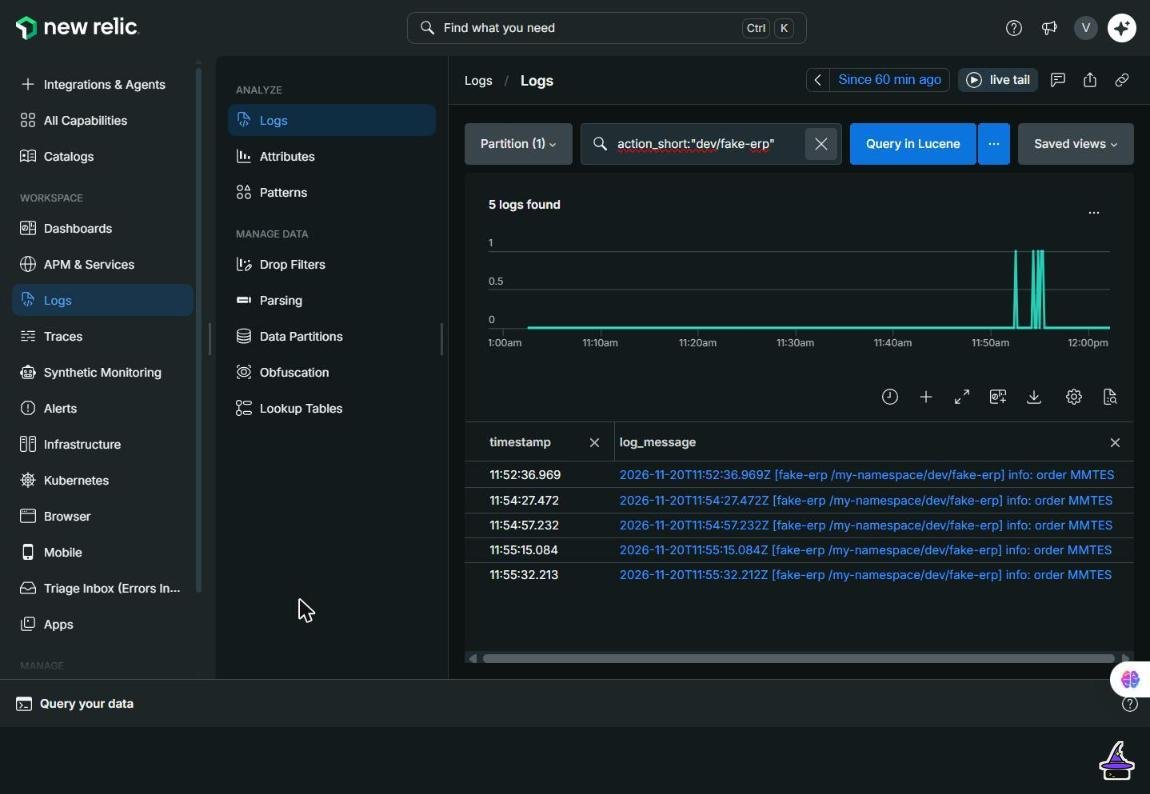
action_short: the five test lines from the fake ERP action.Each line arrives as one New Relic log with these attributes: action (/<namespace>/<package>/<action>), action_short (<package>/<action>), activation_id, log_message, log_stream, log_timestamp, namespace, newrelic.source, plugin.type, plugin.version and timestamp. There is no message and no level attribute. The whole line, including the logger's [<action> /<namespace>/<package>/<action>] info: prefix, is in log_message, so search that field. An error logged by the stuck-order job also came in on log_stream stdout: the level exists only as text inside log_message. The namespace arrives as an attribute on every line.
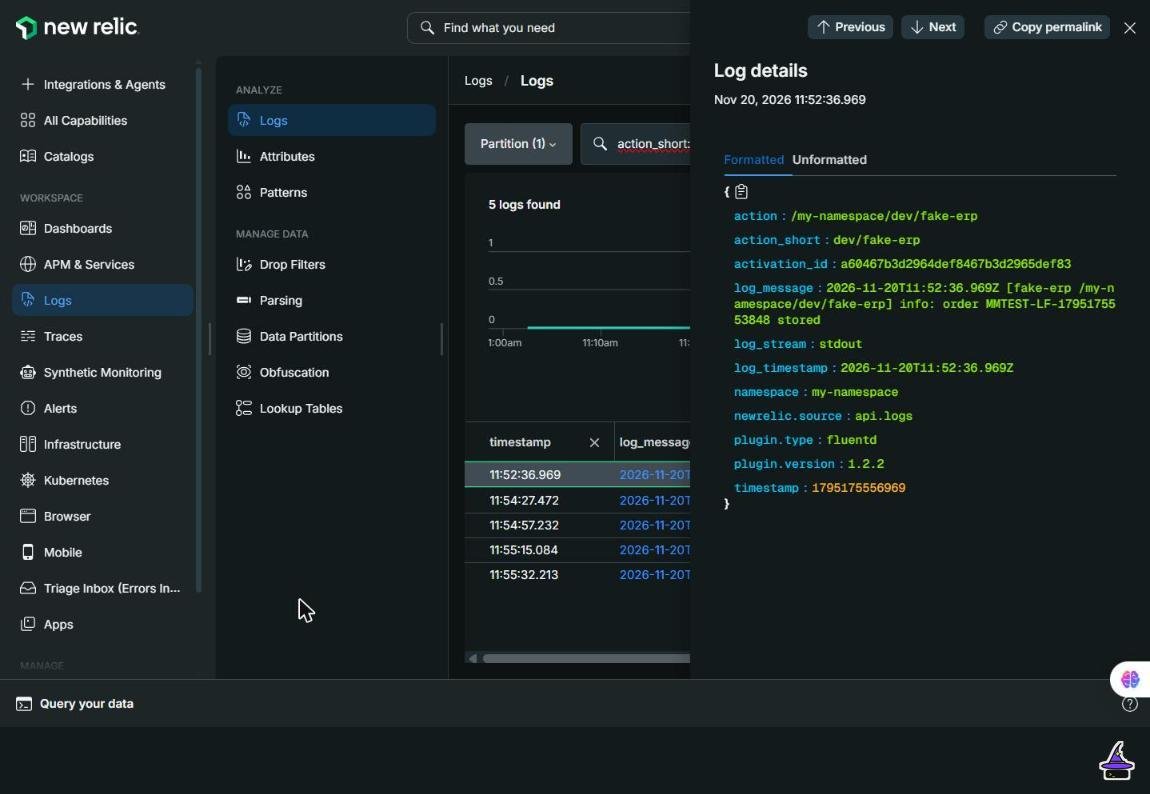
log_message.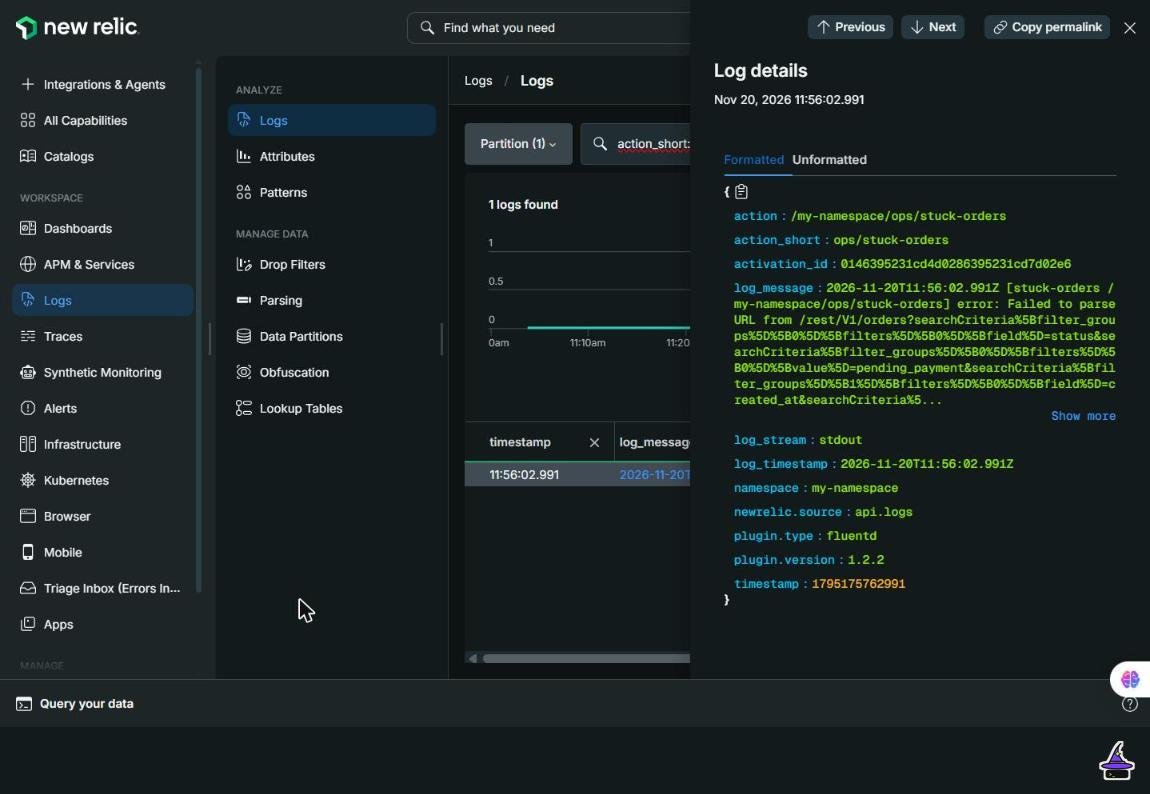
log_stream is stdout, and the level is only in the text.To pull an action's lines with NRQL instead of the Logs search (swap in your own package/action):
SELECT timestamp, action_short, log_stream, log_message FROM Log WHERE action_short = 'dev/fake-erp' SINCE 1 hour agoWhen nothing arrives, ask App Builder why
Forwarding errors are recorded for you. This shows the most recent 10, from up to 30 days back (with a working setup it prints "No log forwarding errors for the last configured destination 'new_relic'"):
aio app config get log-forwarding errorsThe usual causes are the wrong regional base URI, a key that isn't an ingest license key, or a deploy that skipped the forwarding update.
Agree what goes in a log line
Once logs leave your terminal, more people read them, so set a few rules for the team:
- one line per significant step, with the order number or SKU in it, so it's searchable;
- no tokens, API keys or customer personal data, ever;
- errors logged with the reason and the next action ("will retry in 15 minutes"), not just a stack trace.
The first thing I'll build once forwarding works is a New Relic dashboard just for App Builder logs, so I can monitor them in one place.
Switching back is the same command with Adobe I/O Runtime as the destination; remove NEW_RELIC__LICENSE_KEY from .env yourself afterwards.
Tested on: my Stage workspace with a New Relic account in the EU region. set applied at once with no deploy, and get showed only the destination and base URI. In four warm runs, each log line could be found in New Relic within about 10 to 12 seconds of the request; that's an upper bound, because one search in the Logs UI took about 10 seconds. The first run's line was there when I first looked, about a minute and a half later, and I didn't time it. The line's own timestamp was 1.2 to 3.1 seconds after the request, which is the action's run time. Successful blocking web calls were forwarded. One thing differed from Adobe's documentation, which says default storage keeps logs only for failed or asynchronous activations: with forwarding off, a successful blocking web call still had its log line in aio rt activation logs.
Not tested: a cold action, the wrong-region and wrong-key cases (the region advice above is from the docs), a deploy with New Relic forwarding on, a second workspace, the 10 MB cut-off and LOG_LEVEL filtering.
Done!
The 3 a.m. failure now shows up where the person on call is already looking. Every episode published so far is on the series page.