
Events tell your app what happened. Webhooks ask your app what should happen. Adobe Commerce calls your endpoint at a specific point, waits for the answer, and acts on it: carry on, stop with a message, or change the data. That's the out-of-process version of a before plugin. It also puts a network call inside a customer's request, so every decision below is about what happens when that call is slow or fails. I ran it on a real Stage instance; the note at the end says what that proved and what is still open.
The example blocks adding a product to the cart when an external check says no, such as a restricted item or a regional rule. About an hour.
You’ll need
- The App Builder project from the earlier episodes
- Adobe Commerce with webhooks available. On PaaS, install the webhooks module as Adobe's installation guide describes; on Commerce as a Cloud Service, webhooks are managed in the admin
- An action that answers in well under a second
Know the response operations
A webhook endpoint returns HTTP 200 with JSON operations. Commerce supports JSON responses only.
{ "op": "success" }
{ "op": "exception", "message": "This item can't be added to your cart." }
{ "op": "replace", "path": "<path/to/field>", "value": "<new value>" }
{ "op": "add", "path": "<path/to/list>", "value": { "...": "..." } }
{ "op": "remove", "path": "<path/to/field>" }
success lets Commerce carry on. exception stops the operation and shows the message, or the hook's fallbackErrorMessage if you send none. add, replace and remove change the data instead of blocking, and take a path into the payload. This episode only needs the first two.
Declare the webhook
On PaaS, webhooks are declared in a webhooks.xml in a small module. Each hook names the Commerce method to hook, the URL, how long to wait, whether it's required, and the fields to send.
Pick the method with care. The obvious one, observer.checkout_cart_product_add_before, is dispatched only in Magento\Checkout\Model\Cart::addProduct(), which the storefront add-to-cart controller calls. GraphQL addProductsToCart and REST POST /V1/guest-carts/{id}/items skip it. On my Stage instance (Adobe Commerce 2.4.8-p5) I hooked it, and a restricted SKU went into a guest cart through both APIs with no call to my action. observer.sales_quote_add_item is dispatched in Quote::addItem(), which every channel uses. With it, GraphQL and REST blocked the restricted SKU on Stage; the storefront follows from the source, and I didn't run it with this hook. Use that one.
<config xmlns:xsi="http://www.w3.org/2001/XMLSchema-instance"
        xsi:noNamespaceSchemaLocation="urn:magento:module:Magento_AdobeCommerceWebhooks:etc/webhooks.xsd">
  <method name="observer.sales_quote_add_item" type="before">
    <hooks>
      <batch name="cart_rules">
        <hook name="restricted_sku" url="{env:CART_CHECK_URL}"
              timeout="2000" softTimeout="500" required="false"
              fallbackErrorMessage="We couldn't check this item. Please try again.">
          <fields>
            <field name="product.sku" source="data.quote_item.sku"/>
          </fields>
        </hook>
      </batch>
    </hooks>
  </method>
</config>
bin/magento setup:upgrade
bin/magento webhooks:list
bin/magento webhooks:info observer.sales_quote_add_item --depth=4webhooks:info prints the payload Commerce sends for that method. Use it to pick the exact source paths for your fields rather than guessing. The field name decides the shape the action receives, so name="product.sku" arrives as { "product": { "sku": "..." } } whatever the source path is. In production mode, run bin/magento cache:clean config after changes. On Commerce as a Cloud Service, the same settings are entered in the admin under System > Webhooks, where Webhooks List shows the methods you can hook into.
Verify that the call came from Commerce
Your action's URL is public. In Stores > Settings > Configuration > Adobe Services > Webhooks, enable digital signatures and click Regenerate key pair. Commerce then signs each request in the x-adobe-commerce-webhook-signature header. Copy the public key into .env, and pass it to the action. The action needs the raw body to verify, so turn on raw-http:
cart-check:
  function: actions/cart-check/index.js
  web: 'yes'
  inputs:
    PUBLIC_KEY: $PUBLIC_KEY
    RESTRICTED_SKUS: $RESTRICTED_SKUS
  annotations:
    raw-http: true
    final: true
const crypto = require('crypto')
async function main (params) {
const signature = params.__ow_headers['x-adobe-commerce-webhook-signature']
const verifier = crypto.createVerify('SHA256')
verifier.update(params.__ow_body)
if (!signature || !verifier.verify(params.PUBLIC_KEY, signature, 'base64')) {
return { statusCode: 200, body: JSON.stringify({ op: 'exception' }) }
}
// raw-http delivers the body base64-encoded: verify it as received, then decode to read it
const payload = JSON.parse(Buffer.from(params.__ow_body, 'base64').toString('utf8'))
const allowed = await isAllowed(payload.product?.sku)
return {
statusCode: 200,
body: JSON.stringify(allowed
? { op: 'success' }
: { op: 'exception', message: "This item can't be added to your cart." })
}
}
exports.main = mainThe action blocks only the SKUs listed in RESTRICTED_SKUS, a comma-separated list in .env. Unset, it allows everything. My first run of the real action on Stage passed every SKU for exactly that reason, so set it and redeploy before you test.
Tip: Regenerating the key pair invalidates the old public key immediately. Update .env and redeploy in the same change.
Choose fail-open or fail-closed on purpose
required="false" means Commerce logs the failure and carries on if your endpoint times out or errors: the check fails open. required="true" means Commerce logs it and throws: the check fails closed. Decide per hook, and write the reason in the module:
- Nice to have (recommendations, soft limits): fail open.
- Legal or financial (restricted goods, credit limits): fail closed, with a short
timeout, monitoring, and an on-call owner.
softTimeout adds a notice to the log when a call is slow but still under timeout. Alert on it before customers notice.
Test without clicking through the storefront
On PaaS, webhooks:dev:run calls your hook with a payload you supply. Start from the payload webhooks:info printed, and trim it to the fields your hook sends. Give the method with its type suffix, :before. Without it the CLI answers that the webhook is not registered.
bin/magento webhooks:dev:run observer.sales_quote_add_item:before '{"data":{"quote_item":{"sku":"RESTRICTED-1"}}}'dev:run applies the hook's rules. It prints "The webhook was successfully processed." also when a rule skips the call, so the message alone doesn't tell you the action ran. Only the action's activation list shows the difference: a skipped call leaves no activation.
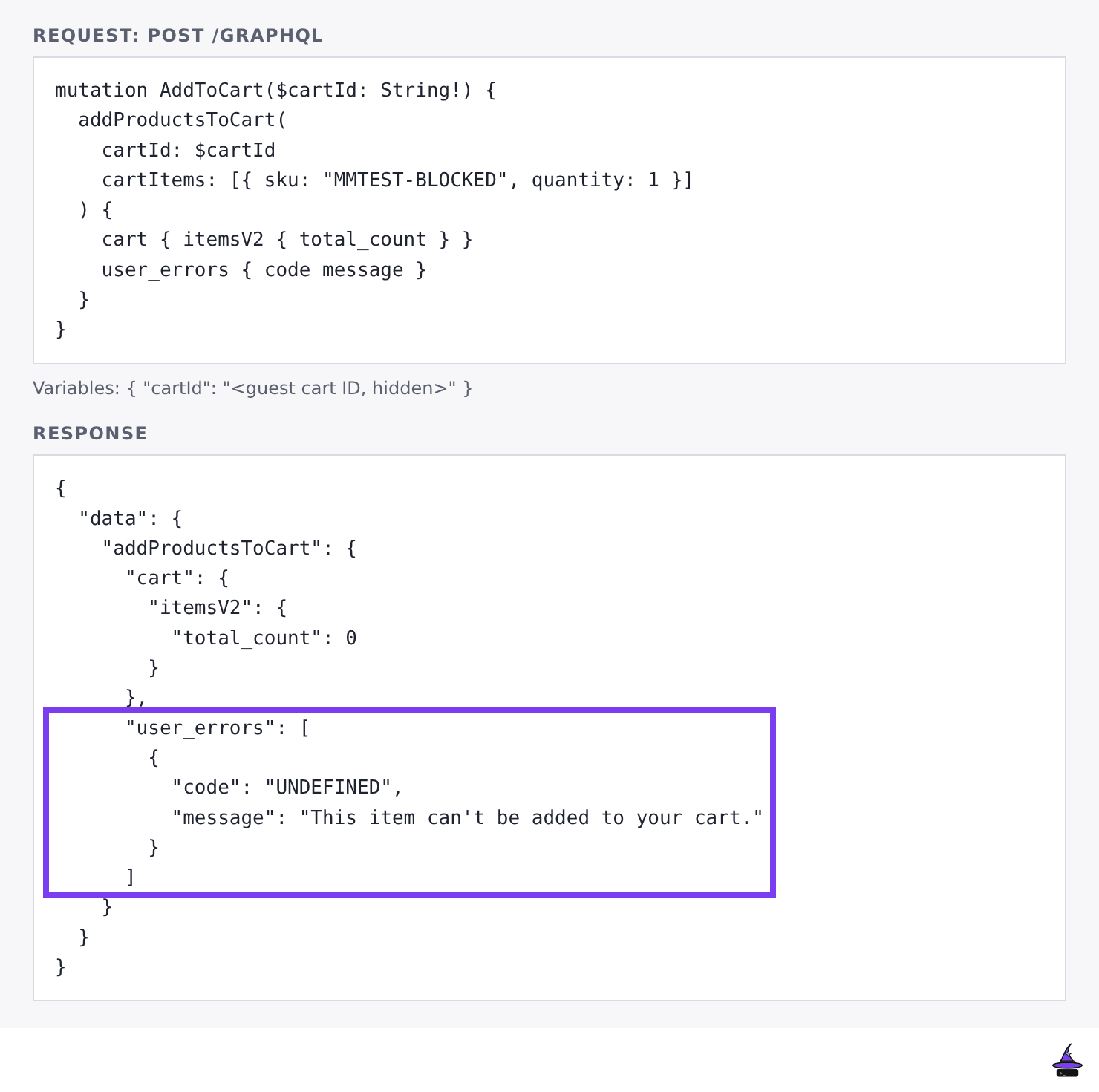
On the real channels, a block looks different to each client. GraphQL returns the message in user_errors with code UNDEFINED, so a headless client gets the text but no specific code. REST returns HTTP 400 with the message.
For a history of real calls, enable database logging under Stores > Settings > Configuration > Adobe Services > Webhooks, and read them at System > Webhooks > Webhook Logs.
These are Runtime activation figures from the scratch action I used in my first deploy, which skips signature verification. They are not end-to-end checkout timing, which I didn't measure. A cold start waited 118 to 127 ms, then took 13 to 14 ms to initialise and 16 to 17 ms to run. A warm call took about 3 ms.
Add the unhappy paths to Playwright
Stop the action and add an item. Make it slow. Return invalid JSON. Each should behave exactly as your fail-open or fail-closed choice says. Add those cases to the Playwright suite from the Playwright regression checks post, so a later change can't flip them without a red test.
Tested on: unit tests of the cart-check action and its signature check (real RSA keys, a tampered body, a base64 body, an escaped-newline PEM, and a missing key answering 500), and my Stage instance (Adobe Commerce 2.4.8-p5) for the rest. webhooks:dev:run blocked the restricted SKU and passed the other on both hooks, and the signed path from Commerce passed the action's signature check. The storefront add-to-cart was blocked on the first hook, and GraphQL and REST bypassed it. With observer.sales_quote_add_item added, GraphQL and REST blocked the restricted SKU, and the other SKU went in.
Not tested: end-to-end timing, the required="true" fail-closed behaviour, the exact message text on the storefront page, which I didn't capture, storefront add-to-cart with observer.sales_quote_add_item, and whether a storefront add with both hooks registered fires twice. The fail-open and fail-closed rules follow Adobe's documentation. The current list is in the repo README.
Done!
Commerce now asks your app before it acts. Episode 8 puts several APIs behind one GraphQL endpoint with API Mesh, and gets honest about its caching.