
Integrations need somewhere for people to look. Episode 3's stuck-order job alerts a chat channel, and episode 6's export writes to a database, but the merchant's team works in the Commerce admin. From an Adobe Commerce (Magento 2) module they'd expect a grid under a menu item, built in PHP with UI components. With the Admin UI SDK, the page lives in the admin while the code lives in your App Builder app, as a React app the admin loads for you.
The order of work: enable the SDK, get Adobe's sample menu showing, then add the stuck-orders page. About an hour, longer if it's your first React Spectrum page. I built and deployed this extension to my Stage workspace and loaded it in a local Adobe Commerce admin; the note at the end says what that proved and what it didn't.
On my projects, the screen merchants ask for most is a sync status page: what went across, when, and what failed.
You’ll need
- The App Builder project from the earlier episodes, with a web UI (
aio app add web-assetsif you started actions-only) - Adobe Commerce with the Admin UI SDK module installed, as Adobe's installation guide describes for your edition
- Admin access to configure it
- Adobe IMS sign-in for the Commerce admin. Adobe requires it, and without it the extension list stays empty: my SDK log showed "Error while fetching extensions registrations from App Registry" with a 401 "Oauth token is not valid". The SDK looks up extensions in the signed-in admin's IMS org, so that must be your App Builder project's org. Admin IMS applies to every admin user, so try it on a local copy first.
Enable the SDK in the admin
Open Stores > Settings > Configuration > Adobe Services > Admin UI SDK and set Enable Admin UI SDK to Yes. It's off by default.
- Configure eligible extensions chooses which App Builder apps the admin loads. Pick the workspace first. My app was listed for Stage with status Draft, deployed with
--no-publish, so a Stage test doesn't need a publish. Save also refreshes the registrations and stores the chosen workspace as its own setting. - Refresh selected extensions reloads them from the App Builder registry after you deploy a change.
- Database logging (off by default) records what the SDK does. Read the logs under System > Admin UI SDK > Admin UI SDK Logs.
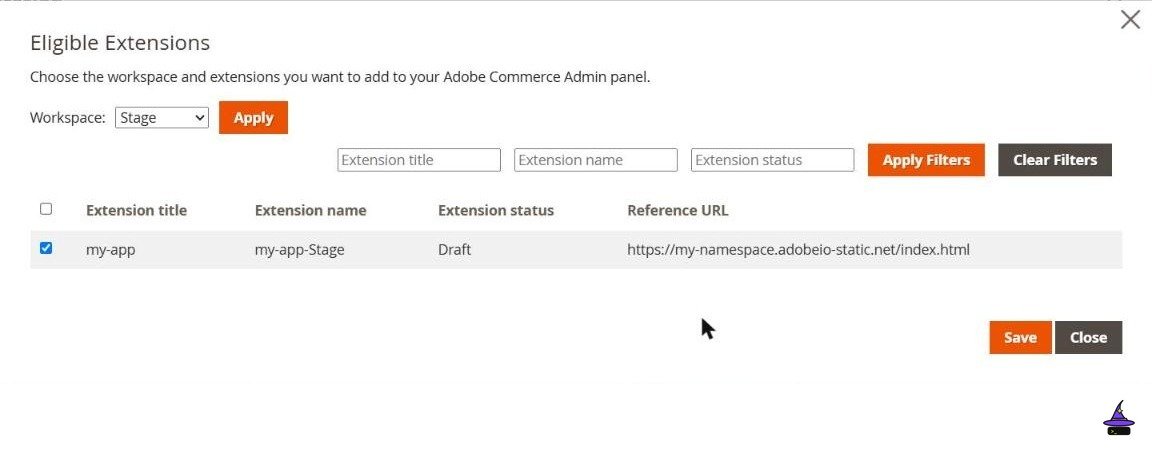
--no-publish deploy is listed as Draft for Stage.Get Adobe's sample showing first
Before writing anything, prove the pipeline with Adobe's sample custom menu. It rules out configuration problems while there's no code of yours to blame.
git clone git@github.com:adobe/adobe-commerce-samples.git
cd adobe-commerce-samples/admin-ui-sdk/v1/menu/custom-menu
npm install
aio console project select
aio console workspace select
aio app use
aio app build
aio app dev
Select the app under Configure eligible extensions. An Apps menu should appear with First App on App Builder. If it doesn't, check the SDK logs before anything else.
Develop locally without deploying each change (PaaS)
On PaaS, the same admin section has Enable local testing and Local Server Base URL, including the port. The admin then loads registrations from your machine instead of Adobe's registry. Adobe's configuration guide includes a small HTTPS server.js and the openssl commands to create its certificate.
Tip: The guide suggests turning off require-adobe-auth on the registration action while testing locally. Turn it back on before you deploy anywhere shared. On Commerce as a Cloud Service, local testing must stay off.
Use the extension point, and choose your SDK version
Admin extensions attach to an extension point, and the folder layout from episode 1 follows from it:
extensions:
  commerce/backend-ui/1:
    $include: src/commerce-backend-ui-1/ext.config.yaml
That's version 1, which this episode and Adobe's v1 samples use. Since Admin UI SDK 4.2.0, Adobe has deprecated it in favour of version 2, commerce/backend-ui/2, built on App Management. There you declare menus, grid columns, mass actions and order-view buttons in an adminUi block of the app's app.commerce.config.ts, and there's no registration action to deploy. A version 2 menu entry takes an id, a label, a description, an optional pageTitle, and an optional parentMenu, such as the Sales menu instead of Apps. The two versions aren't compatible, so pick one per app. Version 1 still works, but deprecated means it can be removed in a later release, so plan the move to version 2 for anything you'll keep.
Build the page against your own action
Rename the sample's menu item to Stuck orders, and point its page at your own action. The page is React with Adobe's React Spectrum components, so it looks at home in the admin. It never calls Slack, the ERP or Commerce directly. First, extend the stuck-order job from episode 3 so each alert it sends is also inserted into a stuck_alerts collection (episode 4). Then a list-alerts action returns the open ones:
// actions/list-alerts/index.js (inside main, after connecting as in episode 4)
const alerts = await client.collection('stuck_alerts')
const rows = await alerts.find({ handled: { $ne: true } }).sort({ at: -1 }).limit(50).toArray()
return { statusCode: 200, body: rows }
A second action, mark-handled, sets handled: true on one alert with updateOne.
Lock the actions down
The page calls your actions with an Adobe IMS token. Mark every action the page calls require-adobe-auth: true, which rejects calls without a valid token. Version 1 has no per-action permissions, so check the token in the action as well: compare its client_id with an allowlist, and refuse anything else. On my workspace a valid token from the aio CLI, with the org header, got 403 from that check, while the page's calls with the admin's token got 200. The token can belong to an integration rather than a person, so don't treat it as the admin user's identity. Version 2 can put menu items, mass actions, buttons and grid columns behind their own Commerce ACL resource (aclProtected: true), and Commerce has a permission-check endpoint (POST /V1/adminuisdk/permission/check) to confirm the signed-in admin holds it. Never rely on the page being hidden: an action URL is reachable from anywhere.
Tip: Ship read-only first. Add the "mark as handled" button only after you've tested who can press it.
Deploy, refresh, and find it
aio app deployClick Refresh selected extensions in the Admin UI SDK settings, and reload the admin. Stuck orders should appear in the menu, listing the open alerts. In my admin, clicking Apps in the sidebar opened the Commerce Resource Center widget first; the extension's page was in the Apps menu.
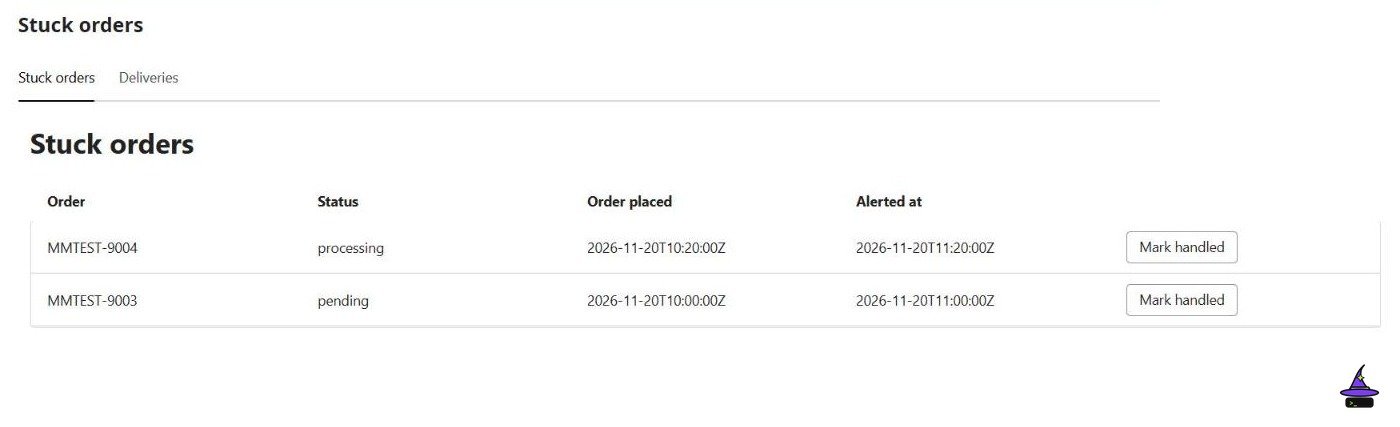
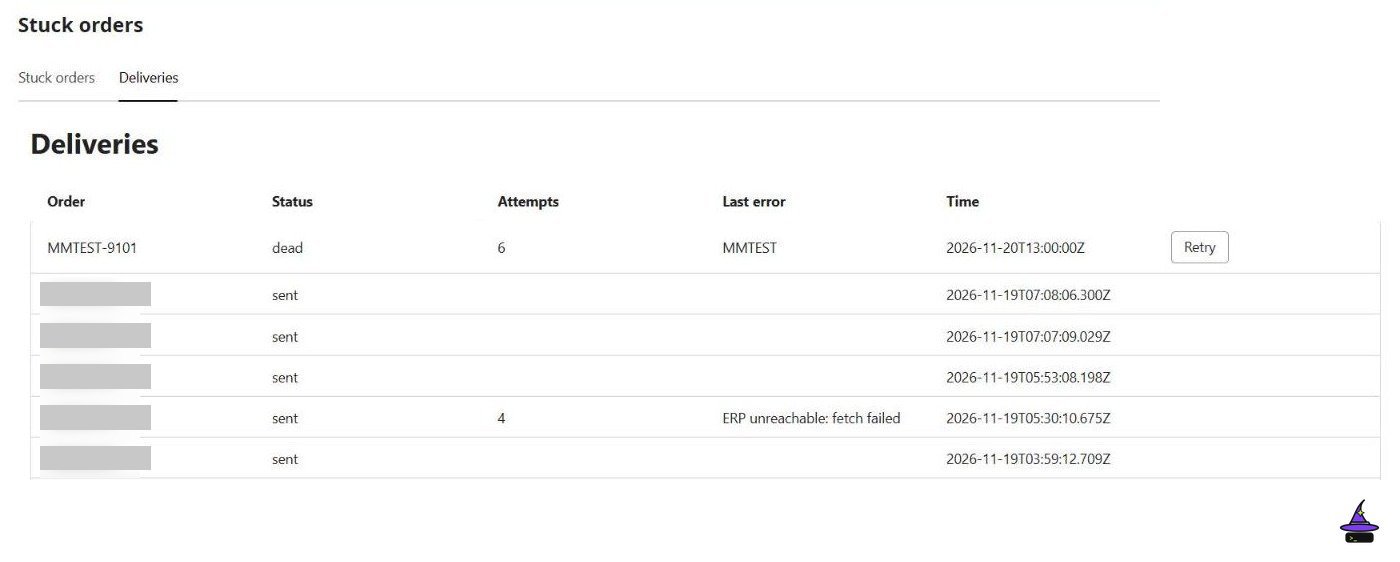
Tested on: unit tests of the actions behind the page (registration, list-alerts, mark-handled, list-deliveries and retry-delivery) with the database faked, and the extension (version 1) deployed to my Stage workspace and loaded in a local Adobe Commerce admin with IMS sign-in. The run used the repo's main, which is ahead of this episode's tag: the client_id allowlist and the Deliveries tab were added after it. The menu entry and the page loaded, the alert list showed two test rows newest first, and Deliveries listed the export rows. Mark handled set handled: true in the database; once, the page's immediate re-list still showed the row until a reload, the second time it disappeared at once, so I can't say yet whether that's a bug. The deployed list-alerts action answered 401 with no token, a made-up token, or a valid token without the org header. A valid CLI token with the org header got 403 from the client_id allowlist. One surprise: successful page calls left no entry in aio rt activation list, while the rejected ones did. Retry on a dead row, with no Commerce credentials deployed, showed "Unexpected token '<' … is not valid JSON" and left the row unchanged: the action's 502 most likely reached the page as an HTML error page from the gateway, though I didn't prove that.

Not tested: Adobe's sample, local testing with aio app dev, Retry with Commerce credentials, the 409 for a sent row, a token from a server-to-server credential, and version 2. The current list is in the repo README.
Done!
The stuck-order alerts have a page where the merchant's team already works. Episode 10 uses every piece so far to port a small module.