
My stuck-orders page passed all 437 unit tests and then failed in the first real admin it opened in: "Something went wrong: Cannot find module './config.json'". That was one of eleven problems between a working version 1 page and a working version 2 page. None of them is hard once you know it. Most of them don't show up until there is a hosted Commerce to install into.
Adobe deprecated the Admin UI SDK's version 1 extension point, commerce/backend-ui/1, in Admin UI SDK 4.2.0. It still works. But Adobe's library, @adobe/aio-commerce-lib-app, no longer generates it from 1.8.0 on, so new tooling assumes version 2. The page I moved is the one from App Builder Ep 9: a menu item and a React page listing stuck-order alerts, with a Mark handled button and a Deliveries tab.
New to App Builder? The App Builder series builds this app from the first episode.
Three terms come up throughout:
- The Admin UI SDK is Adobe's way for an App Builder app to add to the Commerce admin: a menu page, grid columns, mass actions, and buttons on the order, invoice, credit memo and return views (Adobe's overview).
- An extension point is what an app declares in
app.config.yamlto extend an Adobe product.commerce/backend-ui/2adds to the admin, and App Management won't associate an app untilcommerce/extensibility/1is registered. App Builder Ep 1 walks throughapp.config.yaml. - App Management is where an admin associates App Builder apps with a Commerce instance, installs them and manages their settings and updates (Adobe's overview). It opens from Apps > App Management in the admin.
TL;DR
- Version 2 replaces the hand-written
registrationaction with one config file,app.commerce.config.ts, and installs apps through App Management. - Version 2 needs a hosted Commerce: Adobe Commerce as a Cloud Service, or 2.4.8 or later with Admin UI SDK 4.2.0 or later, plus Adobe IMS sign-in for the admin. There is no local path.
- Deploy with a plain
aio app deploy. After--no-publish, association fails with "not compatible with Adobe Commerce". - Test the built bundle, not only the tests: a TypeScript declaration kept my action URLs out of the page.
You’ll need
- An App Builder app with a version 1 admin page (
commerce/backend-ui/1), and Node.js 22 or later - A hosted Adobe Commerce with Admin UI SDK 4.2.0 or later, in the same IMS org as your App Builder project
- Someone who can turn on Adobe IMS sign-in for that admin, because it changes how every admin user logs in
- The I/O Management API in your Developer Console workspace
What changes in version 2
| Version 1 | Version 2 | |
|---|---|---|
| Registration | A registration web action you write, returning menuItems | app.commerce.config.ts; the build generates an app-config action that Commerce reads |
| Menu | Any number of items, your own section, sortOrder | One menu item per app; Commerce makes the section from displayName, under Apps unless you set parentMenu; description is required |
| Installing in Commerce | Configure eligible extensions, then Refresh selected extensions | Apps > App Management: associate the app with the instance, then install it |
| Page entry | @adobe/uix-guest register() plus your own registration component | createExtensionApp() from @adobe/aio-commerce-lib-admin-ui/web |
| Admin token | Read from the guest connection's shared context | useIms() returns { imsToken, imsOrgId } |
| UI libraries | React 18 and React Spectrum 3 worked | React 19 and React Spectrum 2 |
| Access control | One shared resource for every extension | Also aclProtected: true, an ACL resource per item |
| Local testing | A local Commerce admin could load the page | None: App Management doesn't support local Commerce |
| Extra deployed actions | None | app-config, association and installation, generated |
The local testing row matters more than it looks. Adobe states it plainly: "App Management is not supported for local Adobe Commerce installations at this time" (App Management). My version 1 page ran in a local admin. The version 2 page needed a hosted one before I could see it at all.
Move the page
Check the Commerce side first
App Management needs Admin UI SDK 3.3.0 or later; the menu itself needs 4.2.0 or later. On Adobe Commerce 2.4.8-p5, Composer refused magento/commerce-backend-sdk 5.x: adobe-commerce/extensions-metapackage 2.0.3 pins it to ^3.0, and only extensions metapackage 3.0.0 allows ^5. I used an inline alias in the root composer.json until a Commerce upgrade lifts the pin:
"magento/commerce-backend-sdk": "5.2.0 as 3.4.99"Then Adobe IMS sign-in for the admin, which App Management needs on cloud infrastructure. It takes an OAuth Web App credential with the Adobe Commerce with Adobe ID API and the admin's URL in its redirect URI pattern, then:
bin/magento admin:adobe-ims:enableIt asks for the org ID, client ID, client secret and whether 2FA is enforced for the org. Commerce only records that answer; set the enforcement in the Adobe Admin Console. Run it in an interactive terminal: piped through a non-interactive shell, the first prompt read an empty org ID and the command stopped.
Scaffold version 2
npx @adobe/aio-commerce-lib-app initIt writes app.commerce.config.ts, adds commerce/backend-ui/2 and commerce/extensibility/1 to app.config.yaml and install.yaml, and adds a postinstall hook (Adobe's guide). Remove the commerce/backend-ui/1 entry: The two versions are not compatible, so an app uses one. Compare the result with Adobe's custom-menu sample; I kept its layout file for file. The generated App Management actions came out as nodejs:26, so I pinned nodejs:24 as the sample does, in src/commerce-extensibility-1/ext.config.yaml.
Turn the registration action into configuration
Version 1 returned the menu from a registration action:
// src/commerce-backend-ui-1/actions/registration/index.js (version 1)
registration: {
  menuItems: [
    { id: 'StuckOrders::stuck', title: 'Stuck orders', parent: 'StuckOrders::apps', sortOrder: 1 },
    { id: 'StuckOrders::apps', title: 'Apps', isSection: true, sortOrder: 100 },
  ],
  page: { title: 'Stuck orders' },
}
Version 2 declares the menu item as configuration:
// app.commerce.config.ts
export default defineConfig({
  metadata: {
    description: "Open stuck-order alerts and export deliveries",
    displayName: "Stuck orders",
    id: "stuck-orders",
    version: "1.0.0",
  },
  adminUi: {
    menu: {
      description: "Open stuck-order alerts and export deliveries",
      id: "StuckOrders::stuck",
      label: "Stuck orders",
      pageTitle: "Stuck orders",
    },
  },
});
For example, the item's title is now label and its parent is gone, along with the section entry: Commerce now makes a section named after displayName itself. page.title is now pageTitle. sortOrder is gone (the validator drops it without an error). Adobe's validator rejected my first version without menu.description. A menu id takes letters, digits, /, : and _; a hyphen fails validation. metadata.id is the reverse: letters, digits and hyphens only.
Port the page
The page starts from one call, and useIms() replaces the shared-context reads:
createExtensionApp({
  menu: <MainPage />,
  metadata: { extensionId: config.metadata.id },
});
The libraries need React 19 and React Spectrum 2, so my Spectrum 3 page was a rewrite, not a port. Outside a host, useIms() returns an error; show a message for that instead of an empty page. Adobe's samples never call an action of their own, so how a version 2 page finds its action URLs isn't documented. I kept the version 1 way, the config.json that aio app build writes next to the page, and the version 1 headers: Authorization: Bearer <imsToken> and x-gw-ims-org-id: <imsOrgId>. Both worked in the hosted admin.
Keep the actions locked down
Nothing about the page's actions changes. Keep require-adobe-auth: true on each, and check the token's client_id against an allowlist inside the action, because any token from your org passes require-adobe-auth. Nothing documents the client_id of the token useIms() returns. In my run it was the same one the version 1 page sent, so the allowlist didn't change. If yours is refused, log the refused value at warn level and read it from the action's activation log.
Deploy, associate, install
aio app deployThen Apps > App Management in the admin, which opens in Experience Cloud. Pick the org the Commerce instance uses, associate the app, then install it.
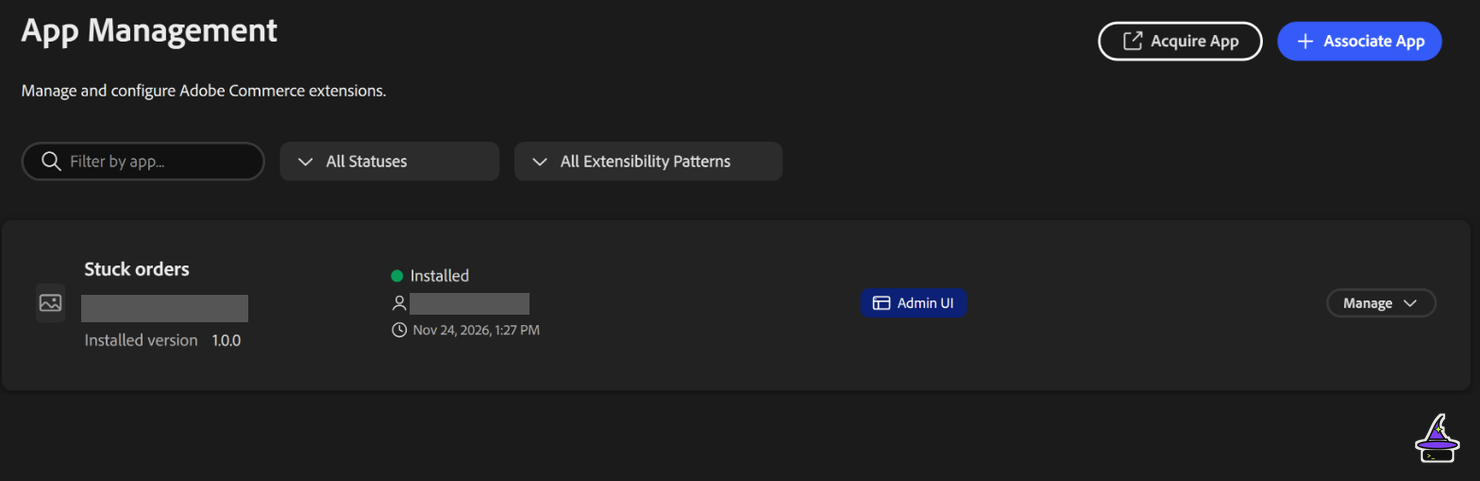
The admin who does this needs the App Management resource under Admin UI SDK in their role. After the install, Apps has a section named after displayName, with the menu item inside.
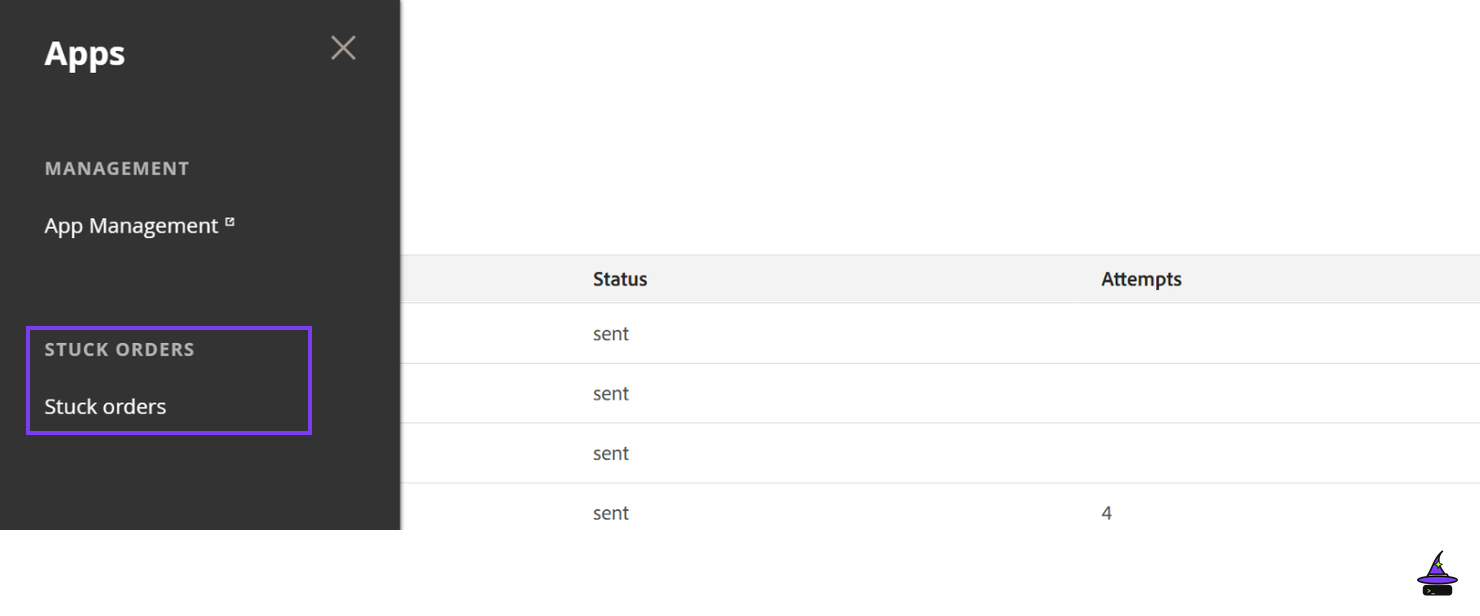
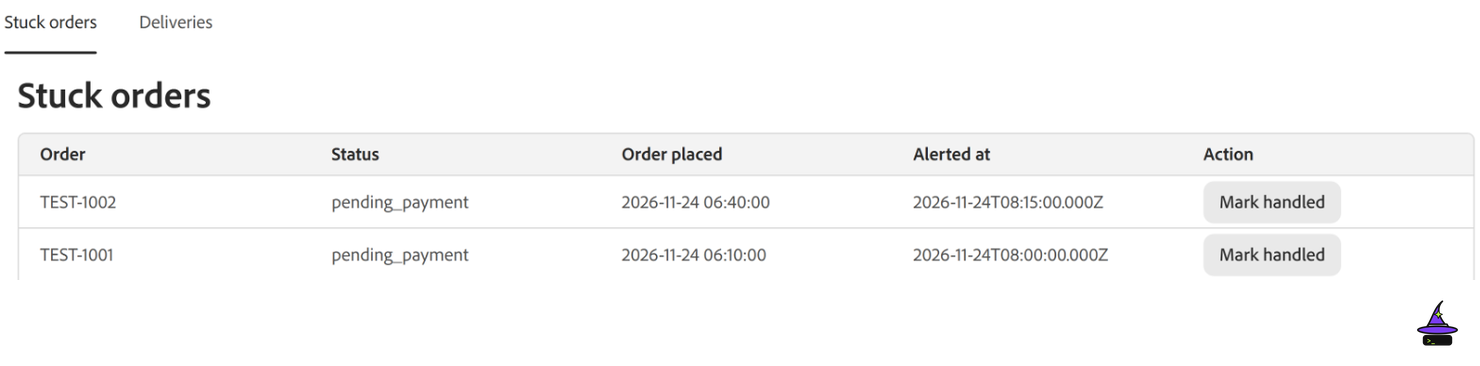
Open it, and the page lists the open alerts.
Clean up
aio app deploy doesn't delete actions whose code is gone: the old registration action stayed deployed until aio rt action delete. The workspace kept its old commerce/backend-ui/1 extension point too, until I removed it through the Console API. And the three generated App Management actions are web actions behind require-adobe-auth only, and installation takes the app's client secret as input. Undeploy them from a test workspace when you're done, and deploy again before the next association.
What went wrong, and the fix
| What I saw | Why | Fix |
|---|---|---|
Composer refuses commerce-backend-sdk 5.x on 2.4.8-p5 | The extensions metapackage pins ^3.0 | Inline alias 5.2.0 as 3.4.99 |
Validator error on adminUi.menu.description | Required in version 2 | Add it |
Generated actions on nodejs:26 | The library's default | Pin nodejs:24 in ext.config.yaml |
.env gained OAuth credentials and NODE_ENV after a deploy | The library's build and deploy hooks write them | Back up .env before every build and deploy, restore after |
| App Management: "not authorized" | Experience Cloud opened in another org | Switch to the instance's org |
| "Not compatible with Adobe Commerce" | aio app deploy --no-publish left commerce/extensibility/1 unregistered; the check answers reasonCode: app-not-associable | Plain aio app deploy |
| The retry picked the wrong project | aio where shows the CLI's global selection, not the repo's .aio | aio config get project --json in the repo |
| "Cannot find module './config.json'" in the admin | declare const require in the TypeScript page made Parcel treat require as a local name, so it never bundled the file; jest missed it because the tests mock config.json | Move the declaration to its own .d.ts file |
| The page looked empty and no activation showed | There were no open alerts, and successful calls of require-adobe-auth actions never appear in aio rt activation list | Seed test rows; expect only refusals in the list |
| Mark handled worked, but the row stayed | The re-list straight after the write still returned it | Reload, or drop the row from the page's state after a 200 |
Error 409 already-current after every deploy | The post-deploy hook asks App Management to upgrade an app whose version didn't change | Harmless; bump metadata.version when you want an upgrade |
The config.json row and the empty page cost the most time, because the page runs in a cross-origin frame on the workspace's static host. In DevTools, switch the console's context to that frame before you read anything; the admin's own context sees none of it. With browser automation I opened the frame's origin in its own tab, opened the admin from a click there, and read the frame from that same-origin window. A check on the build would have caught the first one sooner (App Builder Ep 11 sorts what you can test on your machine and what needs a deploy, for the version 1 app):
grep -c 'require("./config.json")' dist/commerce-backend-ui-2/web-prod/*.jsIt must print 0. Anything else means the action URLs aren't in the bundle.
Before you call it done
- The menu item shows under Apps (or your
parentMenu) for an admin whose role has Admin App Permissions. - The page loads in the admin and calls your actions; refused calls show in the activation list as 401 or 403.
- A call without a token, with a made-up token, or without
x-gw-ims-org-idanswers 401. - Every button that writes was pressed once with test data, and the database shows the change.
.envis back to what you keep in it, and the oldregistrationaction and extension point are gone.
Tested on: Adobe Commerce 2.4.8-p5 on cloud infrastructure (a test environment) with magento/commerce-backend-sdk 5.2.0 and Adobe IMS sign-in, an App Builder Stage workspace, aio-cli 11.2.0, @adobe/aio-commerce-lib-app 2.2.0 and @adobe/aio-commerce-lib-admin-ui 1.3.0, on 24 November 2026. Test setup: one end-to-end run with two seeded test alerts and no customer data. Association, install, the menu, the page in the admin, the header pair, the token against the allowlist, the alert list, Mark handled and the Deliveries tab all worked as described above. The code is at the tag ep9-admin-ui-sdk-v2.1; the version 1 page stays at ep9-admin-ui-sdk.
Not tested: aclProtected with the permission check, Adobe Commerce as a Cloud Service, and an upgrade through App Management after a version bump. The current list is in the repo README.
Done!
Your admin page runs on version 2 and installs through App Management. Next: the episode it belongs to, a page in the Commerce admin.
Discussion
Questions, corrections and “this didn’t work on my version” are all welcome. The discussion runs on GitHub Discussions, so you comment with your GitHub account. It loads from github.com only when you ask.